
An Evidence-Preservation, Personal-Safety and Forensic Response Framework
By Navid Sobbi, Founder and CEO, NSI Global
ORIGINAL PUBLICATION: 26 September 2023 SUBSTANTIVE REVISION: 2 September 2026 (AEST)
This publication is general technical and risk-management guidance, not legal or emergency advice. No checklist or examination can guarantee that a device is free from surveillance.
IMPORTANT NOTICE – PRESERVE POTENTIAL EVIDENCE
If you believe your Android phone may be subject to illegal surveillance and the device could contain evidence relevant to court proceedings, a police investigation, an employment matter or another authorised investigation, do not uninstall suspected applications, factory reset the phone, install consumer spyware-removal software or make unnecessary changes to the device. These actions may alter or destroy valuable forensic evidence.
Stop non-essential use and obtain advice through an appropriate lawyer, case officer, investigator, law-enforcement body, government agency, recognised support organisation or authorised representative. For eligible corporate, legal and authorised matters, contact NSI Global from a separate trusted device or communication channel:
Australia: 1300 000 NSI (674)
UAE: +971 (0)4 409 6824In AUS: If you may be in immediate danger, personal safety takes priority over evidence preservation. Use a safe device to call 000 or contact 1800RESPECT on 1800 737 732.
In UAE: If you may be in immediate danger, personal safety takes priority over evidence preservation. Use a separate safe device, if possible, to call UAE Police on 999 or Ambulance on 998. Women and children affected by domestic violence, abuse or human trafficking can contact the Dubai Foundation for Women and Children’s free 24-hour helpline on 800 111.
Table of Contents
This white paper separates prevention from suspected-compromise response, then maps personal-safety, evidentiary and organisational decisions to a proportionate forensic framework.
- Executive Summary
- Purpose, Audience and Scope
- Android Spyware Is a Category, Not One Product
- The First Decision: Safety, Evidence, Containment or Prevention
- Warning Signs Are Leads, Not Proof
- Preventative Android Security Controls
- What Not to Do When Compromise Is Suspected
- A Forensic Response Framework
- Corporate and Executive Android Risk
- Commissioning a Forensic Spyware Examination
- How NSI Global Supports Appropriate Matters
- Immediate Decision Checklist
- Frequently Asked Questions
- In Sum
- Sources and Further Reading
Executive Summary
Suspected Android spyware is not a single technical problem. It may involve an abusive person with physical access to a phone, a malicious application, compromised cloud credentials, misuse of legitimate device-management functions, or a highly targeted exploit. The correct response depends on what is at stake.
The first decision is not which setting to change. It is a matter of whether the priority is immediate personal safety, preservation of potential evidence, containment of an organisational incident, or routine prevention. These objectives can conflict. Removing an application, updating the operating system, resetting the phone or extensively exploring its settings may improve security in one situation while alerting a suspected operator or altering evidence in another.
This white paper provides a structured response framework for Android users, executives, legal advisers, investigators and organisational security teams. It explains the limitations of visible warning signs, the controls that reduce exposure, the actions that may compromise an investigation and the circumstances in which specialist forensic examination should be considered.
No checklist, scanner or single forensic examination can guarantee that a device is free from surveillance. A proportionate assessment considers the device, associated accounts, available logs, user circumstances, the threat actor, the operating system version, the evidentiary purpose, and the time elapsed.
Purpose, Audience and Scope
This paper is intended for:
- individuals concerned about unauthorised monitoring;
- executives and personnel exposed to targeted surveillance;
- lawyers, authorised representatives and investigators assessing potential evidence;
- corporate security, risk and technology teams responding to a suspected compromised device; and
- decision-makers commissioning forensic spyware or malware analysis.
It focuses on Android phones and tablets. Manufacturer interfaces and menu names vary, and security features change between Android versions. The paper therefore explains decision principles rather than presenting one universal sequence of taps.
This is general technical and risk-management information. It is not legal advice, emergency advice or a substitute for domestic-violence support. If anyone is in immediate danger in Australia, call 000 using a safe device if possible.
1. Android Spyware Is a Category, Not One Product
“Spyware” describes software or a surveillance capability used to collect information without the informed authorisation of the device user or relevant owner. On Android, several materially different scenarios may produce similar concerns.
Stalkerware and Misused Monitoring Applications
Stalkerware is commonly associated with intimate-partner abuse or coercive control. It may be marketed as parental-control, employee-monitoring, anti-theft or family-safety software, then installed or configured without the user’s informed consent. Physical access to an unlocked device, knowledge of its passcode or access to the user’s Google account may be central to the compromise.
These applications may seek access to location, calls, messages, photographs, microphone, camera, notifications or screen content. Some attempt to conceal their icon or use an unremarkable name. Others remain visible because the installer expects the user not to understand the permissions granted.
Commodity Malware and Malicious Applications
An application obtained through a deceptive link, unofficial source or compromised distribution channel may steal credentials, intercept messages, capture input or provide remote access. Malware can also abuse legitimate Android capabilities, including Accessibility, notification access, screen capture, VPN configuration or device administration.
Google Play Protect checks applications for harmful behaviour before and after installation. It is an important control, but a successful scan is not proof that a phone has never been compromised or that every surveillance technique has been detected.
Account Compromise Without Spyware on the Phone
An attacker may learn a great deal without installing a covert application. Access to a Google account, email account, cloud backup, messaging session, location-sharing service or password manager can expose information remotely. A device-only inspection may therefore miss the actual surveillance channel.
Legitimate Management Tools Used Outside Authority
Corporate mobility management, remote support, family supervision and anti-theft tools can be legitimate when transparently authorised. The same capabilities may become abusive or unlawful when installed, retained or used outside that authority. The relevant question is not merely whether a tool is commercially available, but who authorised it, how it was configured and what it collected.
Sophisticated or Commercial Spyware
Highly targeted spyware may exploit vulnerabilities with little or no user interaction. It may leave limited artefacts, operate briefly or rely on infrastructure and techniques that a consumer security application cannot reliably assess. Unusual heat or battery use is not required. Absence of an obvious malicious application is not an exclusion finding.
2. The First Decision: Safety, Evidence, Containment or Prevention
The same action can have different consequences depending on the objective. Before changing the suspected device, determine which pathway applies.
| Situation | Immediate priority | Avoid until advice is obtained |
| Credible threat to personal safety | Reach emergency or specialist support from a separate trusted device and safe location | Confronting the suspected person or making changes that may alert them without a safety plan |
| Possible evidence for police, court, employment or regulatory action | Preserve the device and seek appropriately authorised legal, investigative or forensic advice | Uninstalling applications, factory resetting, mass-deleting data or conducting extensive self-investigation |
| Organisational device or executive compromise | Activate the authorised incident-response process and coordinate legal, security and forensic decisions | Treating the phone as an ordinary help-desk problem or allowing uncontrolled remote wiping |
| General prevention with no suspected compromise | Apply updates, strengthen authentication and review applications and permissions | Assuming one security setting removes every form of risk |
Personal Safety Comes First
Technology-facilitated abuse can escalate when a suspected operator realises access has been interrupted. Australian support guidance recommends making a safety plan before changing a device or account when doing so could create danger. Search for assistance, contact support and change sensitive accounts from a separate trusted device where possible.
The suspected phone may reveal calls, searches, location or messages to the person monitoring it. A “private” browser session on that same phone does not neutralise device-level monitoring.
Evidence Preservation May Conflict with Remediation
Uninstalling a suspected application can remove executable files, configuration data and other artefacts. Opening settings, running scans, rebooting, updating or resetting can change system state and timestamps. Some changes may be necessary for safety or containment, but they should be deliberate and documented when evidentiary use is foreseeable.
Preservation does not mean leaving a person in danger or knowingly allowing an organisational compromise to continue. It means coordinating necessary protective actions with the evidentiary objective, rather than changing the device without recording what was done and why.
3. Warning Signs Are Leads, Not Proof
Possible warning signs include:
- an unknown person knows private conversations, movements or account activity;
- unfamiliar applications, device administrators, management profiles or Accessibility services;
- unexplained location sharing, linked devices or account sessions;
- unexpected prompts for Accessibility, notification, VPN, screen-capture, microphone or camera permissions;
- security controls that have been disabled without explanation;
- unusual data transfers, battery consumption, heat, instability or background activity; or
- alerts about new sign-ins, password changes or account recovery events.
Each sign has legitimate alternative explanations. Battery deterioration, an operating-system update, weak reception and ordinary applications can increase power or data use. System components may use unfamiliar names. Conversely, well-designed spyware may produce no user-visible symptom.
A sound assessment distinguishes three propositions:
- There is a reason for concern. Context or behaviour justifies further inquiry.
- A suspicious artefact has been identified. A setting, application, account event or technical indicator requires explanation.
- Unauthorised surveillance has been substantiated. Evidence supports a conclusion about capability, activity, timing or access.
Moving from the first proposition to the third generally requires more than a symptom checklist.
4. Preventative Android Security Controls
The controls in this section are appropriate for prevention or for remediation after the preservation decision has been made. They are not instructions to alter a suspected evidentiary device.
Keep the Device Within Supported Security Updates
Install Android operating-system, Google Play system and application security updates from trusted sources. A device that no longer receives manufacturer security updates carries increasing exposure. Avoid rooted or modified operating systems for sensitive work unless the security consequences are specifically understood and managed.
Use a Strong Device Lock
Use a strong PIN or password that is not shared or reused. Protect the phone from unattended physical access. Biometrics can improve convenience, but the legal, coercion and emergency implications may differ by situation and jurisdiction.
Protect the Google Account
Review signed-in devices, recovery methods, third-party access and security alerts. Use phishing-resistant authentication where available. Google’s Advanced Protection Program adds stronger account safeguards and tighter controls on downloads and third-party access for users at elevated risk of targeted attacks.
Account review should extend to primary email, messaging, password manager, mobile carrier and cloud services. Changing only the phone’s unlock code does not terminate an attacker’s remote sessions.
Keep Google Play Protect Enabled
Confirm that Play Protect is enabled and has recently scanned installed applications. Treat warnings seriously. Do not describe a clean result as proof of absence: the control reduces risk but does not answer every forensic question.
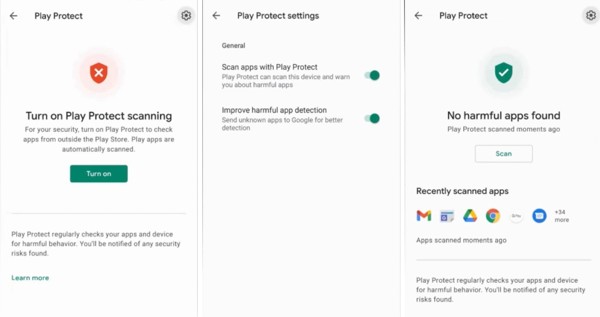
Figure 1. Google Play Protect screens retained from NSI Global’s original Android guide. Confirm scanning is enabled and review any warning; a clean result does not exclude every surveillance pathway.
Restrict Application Sources
Install applications from trusted official stores and keep “install unknown apps” permission disabled unless there is a documented need. Review which application, browser or file manager can install packages. Avoid links or instructions that ask you to weaken built-in protections.
Review High-Risk Permissions and Special Access
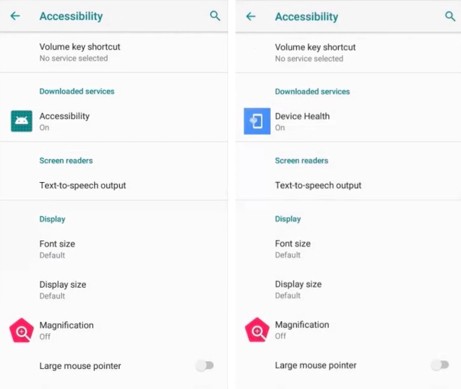
Figure 2. Earlier Android Accessibility screens showing unfamiliar downloaded services. Current menu labels vary; investigate an unfamiliar service before changing it.
Periodically review applications with access to:
- Accessibility services;
- device administration or device-management functions;
- notifications;
- location, including background access;
- microphone and camera;
- SMS, call logs and contacts;
- screen capture or display-over-other-apps capability;
- VPN configuration;
- usage access; and
- battery-optimisation exemptions.
Do not remove a component simply because its name is unfamiliar. Establish its publisher, purpose, installation source and relationship to the device owner or employer.
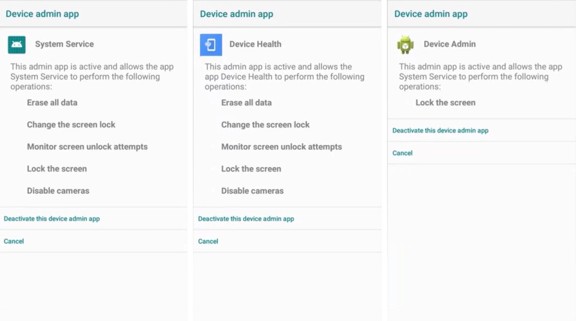
Figure 3. Earlier Android device-administrator screens showing examples of broadly privileged applications. Do not deactivate an item solely because its name is unfamiliar.
Review Certificates, VPNs and Connected Devices
Unknown user-installed certificates or VPN configurations may enable interception or traffic redirection. Also review Bluetooth pairings, linked messaging sessions, nearby-sharing settings and connected devices. Manufacturer and enterprise configurations must be distinguished from unauthorised changes.
Separate High-Risk Activity
Executives, legal teams, researchers, activists, journalists and others exposed to targeted attacks may need managed devices, restricted application sets, stronger account protection, travel-device procedures and rapid escalation arrangements. High-risk security is a continuing operating model, not a one-time settings review.
5. What Not to Do When Compromise Is Suspected
Where safety, litigation, criminal conduct, workplace misconduct or targeted surveillance may be involved, avoid uncontrolled actions such as:
- uninstalling a suspicious application;
- factory resetting, trading in or discarding the phone;
- deleting messages, logs, accounts or cloud data;
- installing multiple consumer “spyware detector” applications;
- extensively opening suspected applications or changing their settings;
- confronting the suspected operator using the monitored device;
- moving a SIM card or restoring a backup without considering evidence and account effects;
- allowing a help desk or repair shop to perform undocumented changes; or
- assuming that airplane mode, a reboot or a clean scan resolves the matter.
If a protective action cannot wait, record the date, time, reason, person authorising it and steps taken, provided doing so is safe. Photographs or notes made on a separate trusted device may assist, but they do not replace forensic preservation.
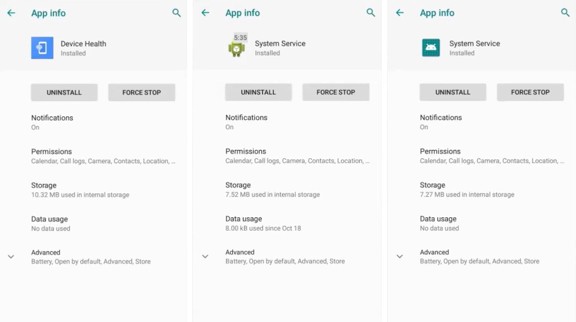
Figure 4. Earlier Android application-information screens showing an Uninstall control. If safety or evidence may be involved, do not use this control until an appropriate response pathway has been chosen.
6. A Forensic Response Framework
Stage 1: Define Authority and the Question
Identify who owns the device and accounts, who may lawfully authorise examination, and what question must be answered. The scope may differ for a personal device, employer-owned handset, mixed-use device, deceased estate, police matter or family-law dispute.
Examples of properly framed questions include:
- Is there evidence of an unauthorised surveillance application or configuration?
- Which accounts or sessions may have been accessed?
- What capability did the identified software have?
- When was it installed, active, altered or removed?
- Can activity be associated with a particular account, operator or network without overstating attribution?
- What evidence should be preserved for an employment, civil, criminal or protective-order process?
Stage 2: Triage Risk Before Handling
Assess personal danger, active compromise, remote-wipe risk, business exposure, privileged material and urgency. Decide whether the device should remain connected, be isolated or continue operating under controlled observation. There is no universal instruction: isolation can protect data while also changing connectivity, preventing observation or triggering an adversary response.
Stage 3: Preserve Device and Context
Record the device’s condition, identifiers, date and time, custody, visible notifications and any actions already taken. Preserve relevant account information and external records where authorised. The context supplied by the user may be as important as the handset because surveillance can occur through shared credentials, linked services and cloud access.
Stage 4: Acquire Data Using Proportionate Methods
The available acquisition method depends on the model, Android version, security state, encryption, device condition and lawful authority. A forensic examiner may use logical, file-system or other supported acquisition approaches. Acquisition is not guaranteed to obtain every artefact, and accessing a live device may itself create some changes that must be documented.
Stage 5: Examine Multiple Evidence Sources
Analysis may include installed packages, permissions, Accessibility and administration artefacts, application data, accounts, logs, databases, network indicators, browser activity, notifications, configuration changes, security events and timeline relationships. Where authorised and available, cloud, enterprise, email, identity-provider, carrier or network records may provide essential corroboration.
Stage 6: Validate and Interpret Findings
A package name or suspicious permission is not enough. Examiners should validate what an artefact represents, whether it was active, the period involved and plausible benign explanations. Conclusions should distinguish observed facts, technical inference and unresolved uncertainty.
Stage 7: Report Scope, Methods and Limitations
A useful report states what was examined, under what authority, using which methods, and with what limitations. It should not convert “nothing identified within scope” into “the phone is guaranteed clean.” Relevant limitations may include unavailable logs, encryption, overwritten data, unsupported device states, elapsed time, remote infrastructure and surveillance channels outside the commissioned scope.
Stage 8: Contain and Recover
After preservation needs are addressed, the response may include credential changes from a trusted device, session revocation, security updates, application removal, device replacement or factory reset, account recovery and monitoring. Restoration from backup should be considered carefully because it may reintroduce unwanted configuration or obscure the investigation timeline.
7. Corporate and Executive Android Risk
A compromised executive or employee phone can expose commercial strategy, privileged communications, negotiations, credentials, location and relationships. Bring-your-own-device arrangements also create difficult boundaries between organisational authority and personal privacy.
An organisational plan should define:
- who can authorise collection and examination;
- how legal privilege and employee privacy will be managed;
- the minimum evidence to capture before containment;
- how identity, mobile-device-management, email, cloud and network logs will be preserved;
- when law enforcement, regulators, insurers or external specialists must be notified;
- how replacement communications will be secured; and
- who decides when a device may return to service.
Mobile-device incidents should connect to the broader digital forensic incident-response process. Treating the handset in isolation can miss compromised accounts, lateral access or related devices.
8. Commissioning a Forensic Spyware Examination
The scope should follow the risk profile and the decision the client must make. A narrow application scan may be inadequate where the concern involves account takeover, an insider, high-value litigation, executive targeting or sophisticated spyware.
Before commissioning work, ask:
- What devices, accounts, cloud services and time period are in scope?
- Is the objective safety, containment, fact-finding, litigation support or criminal referral?
- Who has lawful authority to provide the device and relevant credentials?
- What actions have already been taken?
- Could the suspected operator remotely alter or wipe evidence?
- Are corporate logs, mobile-management records or account records available?
- How will chain of custody and forensic handling be documented?
- What limitations apply to this model and Android version?
- What form of report is required, and who is entitled to receive it?
A broad scope is not automatically better. It should be sufficient to address credible surveillance pathways without collecting irrelevant personal information.
9. How NSI Global Supports Appropriate Matters
NSI Global’s Forensic Spyware and Malware Detection service is designed to examine authorised devices for spyware, malware and related indicators, preserve relevant findings and provide reporting suited to the engagement. Where a suspected phone compromise forms part of a broader organisational incident, Digital Forensic Incident Response can coordinate device evidence with account, cloud, endpoint and other incident artefacts.
The examination scope, available artefacts and technical limitations determine what can be concluded. NSI Global does not guarantee detection of every surveillance method, complete recovery, definitive attribution or admissibility of any particular finding.
NSI Global’s current engagement conditions should be considered before contact. Sensitive domestic-violence, family-law, child-safety, criminal, civil and protection-order matters may need to be referred or instructed through an appropriate lawyer, case officer, investigator, law-enforcement body, government agency, insurer, recognised support organisation or authorised representative. This helps establish authority, safeguarding and a suitable case-management pathway.
10. Immediate Decision Checklist
If Personal Safety May Be at Risk
- Move to a safe location if necessary.
- Use a separate trusted device to call 000 in an emergency.
- Contact 1800RESPECT or another appropriate support service from a safe channel.
- Do not confront the suspected operator without a safety plan.
- Assume activity on the suspected phone may be visible.
If Evidence May Be Required
- Stop non-essential interaction with the device.
- Do not uninstall, reset, update or mass-delete content.
- Record actions already taken and maintain custody.
- Obtain legal, investigative or forensic advice through an appropriate authorised pathway.
- Identify associated accounts and external records that may require preservation.
If This Is an Organisational Incident
- Activate the incident-response and legal escalation process.
- Preserve identity, cloud, email, MDM and network records.
- Coordinate containment with evidence preservation.
- Issue a trusted replacement communication channel where required.
- Document authority, decisions, actions and time.
If This Is Routine Prevention
- Apply supported security updates.
- Protect the device and primary accounts with strong authentication.
- Keep Play Protect enabled.
- Restrict application sources and review special access.
- Remove obsolete applications and revoke unnecessary permissions.
- Maintain a recovery plan and secure backups.
Frequently Asked Questions
Can Google Play Protect Detect All Android Spyware?
No. Play Protect is an important preventative and detection control that checks applications for harmful behaviour. A clean scan does not exclude account compromise, previously removed malware, surveillance outside the device or sophisticated spyware that has not been identified by the control.
Does Battery Drain Prove My Phone Has Spyware?
No. Battery drain, heat, data use and slow performance have many ordinary causes. They may justify investigation when combined with other information, but they are not proof.
Should I Uninstall an Application I Do Not Recognise?
Not automatically. First consider personal safety and whether evidence may be required. Legitimate system or employer-managed components can also look unfamiliar. If compromise is suspected, obtain advice before altering the device where practicable.
Will a Factory Reset Remove Spyware?
A properly completed reset may remove many application-level threats, but it does not by itself secure compromised accounts, revoke remote sessions or prove what previously occurred. Restoring a problematic configuration or account can also recreate exposure. Preserve necessary evidence before resetting.
Can a Forensic Examination Prove Who Installed Spyware?
Sometimes artefacts support conclusions about installation, accounts, timing or activity. Attribution may remain uncertain because devices can be shared, accounts compromised and records incomplete. A report should distinguish technical findings from inference.
Can an Examiner Guarantee That an Android Phone Is Clean?
No. A defensible conclusion is limited to the agreed scope, available evidence, methods, device state and examination period. A negative finding does not guarantee the absence of every surveillance channel.
Should I Change My Passwords on the Suspected Phone?
If the device may be monitored, use a separate trusted device and safe network where possible. Changing credentials on the suspected phone could expose the new values. Consider revoking existing sessions and reviewing recovery methods as part of the response.
Where Can Someone Experiencing Technology-Facilitated Abuse Get Help?
In Australia, 1800RESPECT provides confidential support by phone and online. Use a safe device if monitoring is suspected. Call 000 if there is immediate danger.
Conclusion
Protecting an Android phone from spyware requires more than scanning for an unfamiliar application. Prevention depends on supported devices, strong account security, controlled installation and disciplined permission review. Suspected compromise requires a different posture: prioritise safety, define authority, preserve relevant evidence and examine both the device and associated accounts.
Any specialist assessment should be broad enough to address credible surveillance pathways while remaining lawful, proportionate and focused on the decision the client must make.